
Quick Order Phone Repair Parts Online – The Screen Surgery
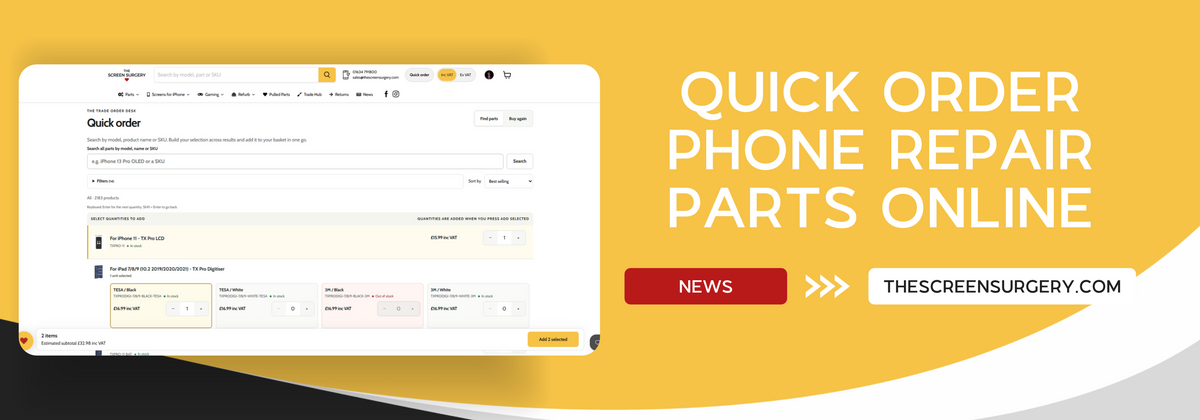
How to Use Quick Order: The Faster Way to Buy Phone Repair Parts
At The Screen Surgery, we know how important it is for repair businesses to have the right parts available when they need them. Whether you're restocking your workshop, preparing for upcoming repairs or placing a larger trade order, finding and ordering replacement parts should be quick and straightforward.
That's why we've created our Quick Order page, designed to make ordering phone and tablet repair parts easier than ever.
From TX Pro iPhone 11 replacement screens to iPhone 12 and 12 Pro replacement batteries, Quick Order allows you to find multiple products, select your quantities and add everything to your basket in one go.
What Is Quick Order?
Quick Order is our streamlined ordering system, built to help mobile phone repair shops and trade customers save time when purchasing replacement parts.
Rather than opening individual product pages and adding items to your basket separately, you can browse products, select quantities and build your order from a single page.
It's particularly useful when ordering a mixture of replacement screens, batteries, charging ports and other repair components for different devices.
How to Use Our Quick Order Page
Step 1: Open Quick Order
Visit our Quick Order page or select Quick Order from the navigation menu on our website.
You'll be presented with our product search, filtering options and quantity selection tools.
You can also access Quick Order directly from specific collections, such as our TX Pro replacement parts for iPhone and iPad.
When using a collection-specific Quick Order page, you'll initially see products from that range. Select Search all parts to search our wider catalogue.
Step 2: Search for Your Replacement Parts
Quick Order makes finding the right phone repair parts simple.
You can search using a device model, product name or SKU.
For example, searching for iPhone 13 can help you locate products such as our iPhone 13 TX Pro Soft OLED replacement screen and compatible replacement batteries.
If you already know the exact part you need, you can search using its SKU instead. For example, entering TXPRO-11 will help you find our iPhone 11 TX Pro LCD replacement screen.
You can also narrow down your results using filters such as:
-
Device model: Find parts compatible with your customer's device.
-
Part type: Filter screens, batteries, charging ports and other components.
-
Product quality: Browse ranges such as TX Pro, Value LCD and Service Pack.
-
Device series: Find parts for specific iPhone, Samsung or iPad generations.
Step 3: Select Your Quantities
Once you've found the correct products, simply enter the quantities required alongside each item.
You can type the quantity directly or use the + and − buttons to adjust your selection.
Products with multiple variants, such as different colours or adhesive options, have separate quantity fields.
For example, our TX Pro iPad 7th, 8th and 9th Generation Digitiser is available with different colour and adhesive options, allowing you to select the exact versions required.
Top tip: Press Enter to move to the next quantity field or Shift + Enter to return to the previous one. This is especially helpful when entering larger orders.
Step 4: Build Your Order Across Multiple Products
One of the biggest benefits of Quick Order is that your selected quantities are retained as you search or move between pages.
For example, a repair shop restocking its shelves might select:
Rather than adding each product individually, you can select all your quantities first and add everything to your basket together.
Your selected item count and estimated subtotal are displayed as you build your order.
You can also click Review all selected items to check and adjust your selections.
Step 5: Add Your Products to the Basket
Once you've finished choosing your products, simply click Add selected.
All the selected products and quantities will be added to your basket together.
From there, you can review your order, check pricing and availability, and complete your purchase through our normal checkout process.
Ordering More Than Just iPhone Parts?
Quick Order isn't limited to iPhone replacement screens and batteries.
By selecting Search all parts, you can browse our wider range of mobile phone and tablet repair components.
For example, alongside our TX Pro iPhone range, you can also find products such as the Samsung Galaxy S23 Ultra OLED Service Pack replacement screen and Samsung Galaxy S23 Ultra Battery Service Pack.
This makes Quick Order a useful tool for repair businesses working across multiple brands and device models.
Reordering Your Regular Parts? Use Buy Again
If you regularly purchase the same replacement parts, our Buy Again feature can make the process even quicker.
Simply sign in to your account and select the Buy Again tab within Quick Order.
You can access products you've previously purchased, making it easier to restock frequently used components without searching for them individually.
Whether you're regularly buying iPhone 11 Value LCD screens or iPhone 13 Pro TX Pro Soft OLED 120Hz screens, Buy Again helps streamline your repeat orders.
Why Use The Screen Surgery Quick Order?
For busy phone repair shops, spending less time ordering parts means more time available for repairs and customers.
With Quick Order, you can:
-
Save time: Select multiple products without opening individual product pages.
-
Order in bulk: Quickly enter quantities for your regular replacement parts.
-
Search efficiently: Find components by product name, device model or SKU.
-
Keep your selections: Move between search results without losing your chosen quantities.
-
Manage repeat orders: Use Buy Again to find previously purchased products.
-
Shop across multiple device ranges: Order parts for iPhone, Samsung, iPad and more.
Start Using Quick Order Today
At The Screen Surgery, we're always looking for ways to make ordering replacement parts easier for the repair trade.
Our Quick Order system is designed to help you restock your workshop, prepare for repairs and place larger orders with less hassle.
Whether you need a few replacement screens or a complete workshop restock, Quick Order makes building your next order simple.
Or browse our TX Pro iPhone and iPad range using Quick Order.
- Thomas Gregg
Mobile Phone Parts UK - The Screen Surgery
The Screen Surgery - Your trusted supplier of mobile phone repair parts.


Leave a comment